
Accessibility Standards for Kiosks, Signage, and Digital Wayfinding
Accessibility is where a self service deployment either works for everyone or quietly excludes people. It is also where a growing number of contracts are decided, because accessibility conformance is now a scored requirement in most public sector, healthcare, and education procurement.
This page sets out the standards that actually apply to interactive kiosks, digital signage, and digital wayfinding in North America and Europe, what each one requires, and how MediaTile products address them.
Looking for how mediatile.com itself conforms? That is a different question with its own page. See our website accessibility statement.
Two Different Obligations
Buyers routinely conflate two separate things, and procurement documents often do the same.
The physical obligation
A kiosk is a piece of built environment. It has to be reachable, operable, and readable by someone using a wheelchair, someone with limited dexterity, and someone with low vision. In the United States this is governed by the ADA Standards. In Canada it is governed by CSA standards and by AODA requirements.
The digital obligation
What runs on the screen is software, and software accessibility is governed separately, by WCAG and the regulations that adopt it. Since 2024, two US federal rules have extended these requirements explicitly to kiosk based services.
A kiosk can satisfy every physical requirement and still fail completely, because the application running on it cannot be operated by someone who cannot see the screen. In our experience, most procurement failures happen on the second half.
The Closed Functionality Problem
There is one structural issue specific to kiosks that shapes everything below.
A kiosk is what accessibility standards call a closed functionality product: a device a user cannot attach their own assistive technology to. There is no keyboard, no access to system settings, and no way to launch a screen reader or a magnifier. Every tool a person relies on elsewhere is unavailable at the exact moment they are standing in front of your screen.
Standards therefore require the product itself to supply the equivalent capability. EN 301 549 states the principle plainly in clause 5.1:
Where ICT has closed functionality, that closed functionality shall be operable without requiring the user to attach, connect or install assistive technology.
EN 301 549, clause 5.1
In practice, for a wayfinding or directory kiosk, that means three things have to be built into the application itself:
- Speech output, because a screen reader cannot be attached.
- User controlled text sizing, because a system magnifier cannot be launched.
- Step free routing, because a route that assumes stairs is not a route for every visitor.
The word that matters is user controlled. A text size an administrator set once at installation does nothing for the person standing at the screen. If the visitor cannot change it themselves, without asking staff, it is a configuration setting rather than an accessibility feature. This is the distinction most often missed in procurement responses, and the one most often tested during evaluation.
The Standards That Apply
Not every standard applies to every deployment, and several commonly cited ones apply more narrowly than vendors suggest. This is the current picture.
| Standard | Region | Applies to | Requires | Status |
|---|---|---|---|---|
| ADA Standards §216, §703 | US | Signage as built element | Tactile characters 48 to 60 in above floor, raised min 1/32 in, non glare finish, light on dark or dark on light contrast | In force |
| ADA Standards §308 | US | Reach ranges for operable parts | Forward and side reach limits for anything a visitor must touch | In force |
| ADA Standards §707 | US | ATMs and fare machines only | Speech output, tactile keys, privacy | In force. Does not cover information kiosks. The Access Board has signalled intent to extend it to self service kiosks by rulemaking |
| Section 508 (2017 refresh) | US | Federal ICT procurement | WCAG conformance for ICT | In force |
| HHS Section 504 Final Rule | US | Recipients of HHS federal funding, including most hospitals | Websites, mobile apps and kiosk based services at WCAG 2.1 AA. Explicitly names wayfinding kiosks | Published May 9, 2024. Deadlines May 11, 2027 (15+ employees) and May 10, 2028 (smaller) |
| DOJ Title II Final Rule | US | State and local government, public universities and hospitals | Web content and mobile apps at WCAG 2.1 AA | Published April 24, 2024. Deadlines April 26, 2027 (large) and April 26, 2028 (smaller and special districts) |
| AODA, O. Reg. 191/11 | Ontario | Public spaces and organizations | Signage contrast, tactile requirements, braille, tactile walking surface indicators | Full compliance since January 1, 2025. Penalties to $100,000 per day for individuals and $200,000 per day for corporations |
| CSA/ASC B651.2 | Canada | Self service interactive devices, including ABMs | Design, manufacture, site preparation and installation requirements | 2025 edition current. The 2007 first edition was superseded by 2022, then by 2025 |
| CAN-ASC-2.4 | Canada | Public spaces, transportation facilities, workplaces | Lighting and contrast, wayfinding paths and tactile indicators, signage including audible and electronic signage, maps | Draft, posted January 2026. Publication expected summer 2027 |
| EN 301 549 (Mandate M/376) | EU | Public procurement of ICT | Clause 5.1 governs closed functionality | In force, V3.2.1. V4.1.0 in draft |
Section 707 does not cover information kiosks, yet
ADA Section 707 requires speech output on automatic teller machines and fare machines. It is frequently cited as applying to kiosks generally. It does not: interactive transaction machines other than ATMs, and other self service machines, fall outside it.
However, the US Access Board has signalled its intent to apply the technical requirements from Section 707 to self service transaction machines and self service kiosks through rulemaking. Any kiosk being specified today with a service life beyond a few years should be procured as though those requirements will apply within its lifetime.
Check the edition of any Canadian standard you are citing
CSA/ASC B651.2 has been revised twice in three years. The 2007 first edition was superseded by the 2022 edition, which was superseded by the 2025 edition, whose changes include updates for new technologies. References to the 2007 edition are still circulating widely in procurement documents and vendor literature. If a specification you have been given cites it, it is worth confirming which edition the evaluator actually intends to apply.
Why the rules say WCAG 2.1 and the application says WCAG 2.2
The HHS and DOJ rules cite WCAG 2.1 Level AA because that was the current W3C Recommendation when they were drafted. WCAG 2.2 became the Recommendation in October 2023. It carries forward the 2.1 success criteria and adds nine more, several of them directly relevant to touch kiosks, such as minimum target size and visible focus. The one 2.1 criterion that 2.2 retires, 4.1.1 Parsing, is one W3C now treats as always satisfied under 2.1 as well.
A product that conforms to WCAG 2.2 AA therefore satisfies what the regulations require and goes past it. If a procurement document cites 2.1, the accurate answer is: conforms to WCAG 2.2 Level AA, which incorporates and exceeds the WCAG 2.1 Level AA standard cited.
Compliance Deadlines
Three of the requirements above have dates attached. If you are specifying equipment now, these are the ones that will land inside its service life.
How MediaTile Products Address These Requirements
Hardware
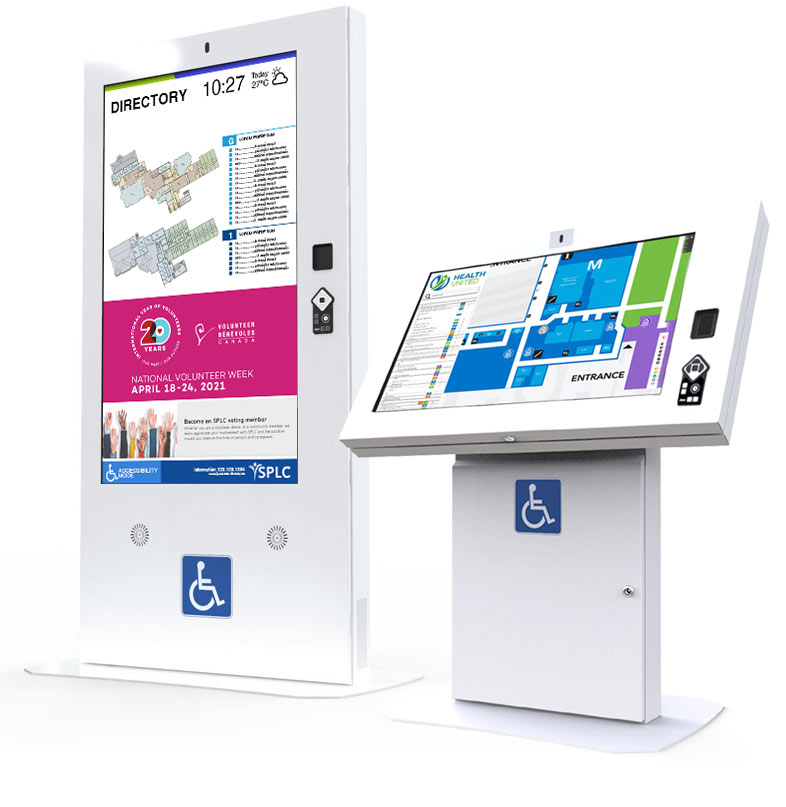
Our kiosk range has been assessed by CSA Group against CSA/ASC B651.2-2025, the current edition of the Canadian standard for accessible self service interactive devices, and is designed to the reach range requirements of ADA Standards Section 308. Enclosures are available in configurations addressing reach range, screen height and angle, approach clearance, and operable part placement, and our accessibility focused range is deployed in healthcare, government, transit, and education environments where conformance is a procurement requirement.
Assessed by CSA Group against CSA/ASC B651.2-2025.
Software: Digital Wayfinding
MediaTile Wayfinding conforms to WCAG 2.2 Level AA, the current W3C Recommendation, which incorporates and exceeds the WCAG 2.1 Level AA standard cited by the HHS and DOJ rules above.
It is built around the closed functionality principle. Three accessibility controls are operated by the visitor, at the kiosk, with no staff assistance and no access to the operating system required.
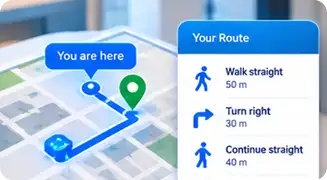
Spoken turn by turn directions
Read aloud through the kiosk speakers alongside the on screen steps.
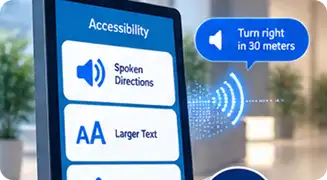
A visitor facing text size toggle
Someone with low vision can enlarge the interface themselves, without asking staff.
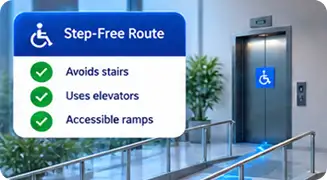
Step free routing
Avoids stairs and escalators and directs visitors to elevators and ramps, using only the transitions the venue has marked accessible.
Alongside these:

- 16 languages of turn by turn directions with a visitor facing language switcher, and right to left rendering for Arabic.
- Configurable text size, label size, and contrast per location, so a screen can be tuned to the lighting and viewing distance of the space it stands in.
- Precomputed accessible routes in the offline kiosk package, so step free routing continues to work during a network outage.
- Per path and per transition accessibility flags, so routing decisions are driven by the venue’s own data rather than an assumption.
Software: Content and Signage
The MediaTile platform supports contrast control, type size control, multilingual content, and scheduled content, all of which contribute to conformance for the content you publish.
Responsibility is shared here, and it is worth being clear about the split. The platform provides the controls. The content your team creates has to use them: sufficient contrast, readable type sizes at viewing distance, meaningful alternatives for information carried only by images. We cover this during onboarding, and we can review a content template against these requirements on request.
For Your RFP
We are regularly asked for accessibility documentation as part of a procurement response. We can provide:
- A statement of conformance for the specific hardware configuration you are specifying.
- A description of the accessibility features of the software, mapped to the requirement your procurement document cites.
- Support in completing the accessibility sections of your evaluation matrix.
We do not publish a VPAT. For any procurement we provide a written statement of conformance for the specific hardware configuration you are specifying, citing the CSA Group assessment against CSA/ASC B651.2-2025, together with a description of the wayfinding application’s accessibility features mapped to the standard your procurement document cites, including its WCAG 2.2 Level AA conformance. Where your procurement supplies its own accessibility matrix, we complete it.
Common Questions
Do ADA requirements apply to information kiosks?
The ADA Standards’ physical requirements, such as the reach ranges in Section 308, apply to kiosks as built elements. Section 707, which requires speech output, applies specifically to ATMs and fare machines and not to information kiosks. However, the US Access Board has indicated its intent to extend those technical requirements to self service kiosks through rulemaking, so kiosks specified today should be procured on the assumption that they will apply within the equipment’s service life.
Does WCAG apply to a kiosk?
Increasingly, yes, through the regulations that adopt it. The HHS Section 504 rule requires kiosk based services at organizations receiving HHS funding to meet WCAG 2.1 Level AA, and the DOJ Title II rule imposes the same standard on state and local government entities. Both have compliance dates in 2027 and 2028.
What does closed functionality mean?
It describes a product a user cannot attach their own assistive technology to, such as a kiosk with no keyboard and no access to system settings. Because a visitor cannot connect a screen reader or launch a magnifier, standards require the product itself to provide equivalent capability, such as built in speech output and text sizing the visitor controls.
Which Canadian standard applies to kiosk hardware?
CSA/ASC B651.2, Accessible design for self service interactive devices including automated banking machines. Check the edition: the 2007 first edition was superseded in 2022 and again in 2025, and older references are still in circulation.
Is there a Canadian standard for wayfinding specifically?
CAN-ASC-2.4, Wayfinding and Signage, is in development with Accessibility Standards Canada. The draft was posted in January 2026 and publication is expected in summer 2027. It covers lighting and contrast, wayfinding, signage including audible and electronic signage, and maps.
Can accessibility features be turned off?
The visitor facing controls in MediaTile Wayfinding are optional per map, so a venue can decide whether to display them. We recommend enabling them in any environment where conformance is a requirement, because a feature the visitor cannot reach does not satisfy a closed functionality requirement.
Do you provide a VPAT?
No, and we do not plan to publish one. We provide a written statement of conformance for the specific hardware configuration you are specifying, citing the CSA Group assessment against CSA/ASC B651.2-2025, and a description of the wayfinding application’s accessibility features mapped to the standard your procurement cites, including its WCAG 2.2 Level AA conformance. If your procurement supplies an accessibility matrix, we complete it. Tell us which standard and edition your document names so the paperwork matches.
Have an Accessibility Requirement to Meet?
Tell us which standard and which edition your procurement document names. We will map our hardware assessment and our software conformance to it, in writing, in the form your evaluation matrix expects.
Standards and deadlines on this page were last reviewed on September 10, 2026.